Enumerating MFA via Microsoft's Password Reset Portal
Microsoft’s Self-Service Password Reset (SSPR) portal is a legitimate feature designed to let users recover their accounts without calling the helpdesk. It turns out it also tells you quite a lot about the accounts in a tenant - whether they exist, what authentication methods they have registered, and in some cases, which ones are likely administrators. This post covers what the portal leaks, why it matters from both sides, and what defenders can do about it.
What is SSPR?
SSPR allows users to reset their own passwords by verifying their identity through a registered second factor - an authenticator app, a phone number, an alternate email address, and so on. It is configured at the tenant level in Entra ID and requires an Entra ID Premium P1 licence.
The portal is publicly accessible at passwordreset.microsoftonline.com with no prior authentication required. When a user enters their email address and clicks Next, the server responds with a list of verification methods registered for that account. This is the point of interest.
How the Portal Works
The flow involves two HTTP requests per account.
Step 1 - Landing page (GET)
Navigating to the portal loads a standard ASP.NET WebForms page presenting a username field.
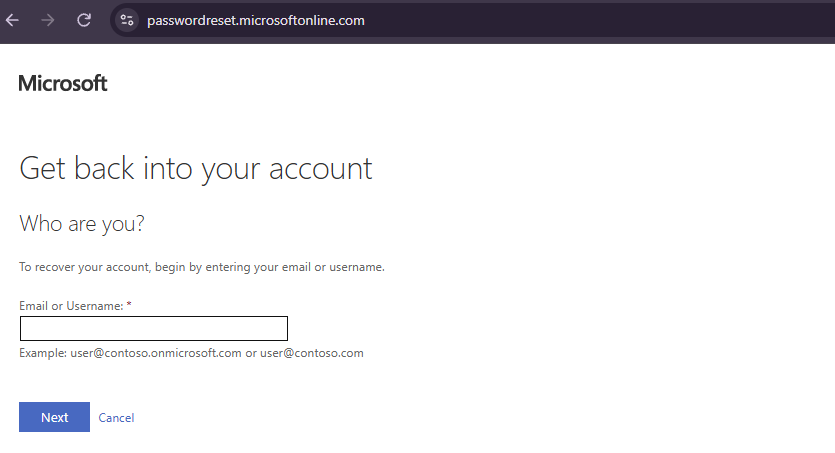
The GET response sets the session cookies and embeds three hidden form fields that are required for the server to accept any subsequent POST:
__VIEWSTATE- encrypted, serialised page state bound to the session__EVENTVALIDATION- a signed list of permitted postback controlsWorkflowConsistencyCheck- a timestamp-based anti-replay value
These are cryptographically tied to the session cookie and cannot be predicted or reused across requests.
Step 2 - Username submission (POST)
Clicking Next triggers an ASP.NET UpdatePanel async postback - not a full page navigation. The browser sends a POST to the same URL with the form tokens from step 1, the email address, and a set of control identifiers that tell the server which button was clicked:
1
2
3
4
5
6
7
8
9
10
POST https://passwordreset.microsoftonline.com/

ctl00$ScriptManagerMain=...UpdatePanelMain|...ButtonNext
__EVENTTARGET=ctl00$ContentPlaceholderMainContent$ButtonNext
__VIEWSTATE=<token>
__EVENTVALIDATION=<token>
ctl00$ContentPlaceholderMainContent$TextBoxUserIdentifier=user@example.com
ctl00$ContentPlaceholderMainContent$CurrentViewName=ViewUserIdentifierVerification
ctl00$ContentPlaceholderMainContent$WorkflowConsistencyCheck=<token>
__ASYNCPOST=true
The response is a pipe-delimited wire format specific to ASP.NET UpdatePanel. The important part is the HTML block injected into the page, which contains a hidden field:
1
2
<input type="hidden" name="ctl00$ContentPlaceholderMainContent$CurrentViewName"
       value="ViewMultigateUserControl" />
This CurrentViewName field is the ground truth for what the server decided. A value of ViewMultigateUserControl means the account exists and SSPR has advanced to the method selection screen. ViewUserIdentifierVerification means the server bounced back to step 1, indicating the account was not found.
Beyond these two primary states, the server returns a range of named views that correspond directly to Microsoft’s documented SSPR error codes. These views are not visible to the user in the same form - users see a friendly error message - but they appear verbatim in the CurrentViewName hidden field of the wire response and can be read directly from the POST reply:
| View name | SSPR error code | Meaning |
|---|---|---|
ViewSsprNotEnabledInUserPolicy | SSPR_0011 | Account exists; no password reset policy defined for this user |
ViewUserNotMemberOfScopedAccessGroup | SSPR_0013 | Account exists; not a member of the group enabled for SSPR |
ViewUserNotEnabled | SSPR_0009 / SSPR_0012 | SSPR disabled at tenant level or missing licence |
ViewFeatureNotAvailable | - | Guest, external, or federated account - SSPR not applicable |
The error codes themselves are documented in Microsoft’s SSPR troubleshooting reference. The key insight is that each one confirms the account exists - the server has looked it up and made a policy decision about it - even though it is declining to offer the reset flow.
Step 3 - Method selection screen
For a valid account with SSPR enabled, the response HTML contains a MultigateAuthenticationControl_RadioTable listing every registered verification method. Methods the user has not registered are present in the DOM but hidden with display:none.
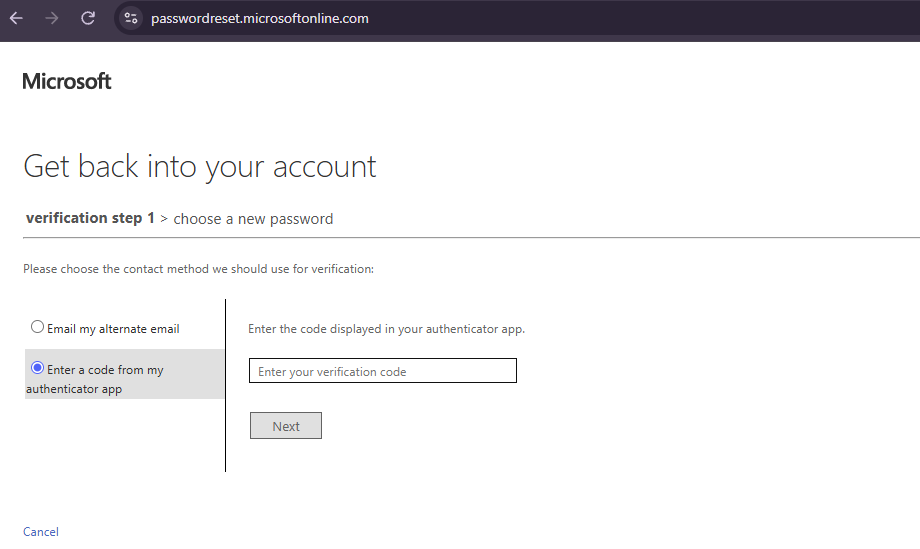
The visible radio buttons directly correspond to what is registered on the account:
1
2
3
4
5
6
7
8
9
10
<table id="MultigateAuthenticationControl_RadioTable">
  <tr id="MultigateAuthenticationControl_AltEmailRadioButtonTr">
    <input id="MultigateAuthenticationControl_AltEmailRadio" type="radio" />
    <label>Email my alternate email</label>
  </tr>
  <tr id="MultigateAuthenticationControl_AppCodeRadioButtonTr">
    <input id="MultigateAuthenticationControl_AppCodeRadio" type="radio" />
    <label>Enter a code from my authenticator app</label>
  </tr>
</table>
Each radio button ID maps to a specific method. Hidden rows (display:none) are skipped - they represent methods the account has not registered or that the tenant policy has disabled.
The legacy CAPTCHA (now removed)
Prior to August 2026, the portal could present a visual CAPTCHA challenge on the landing page before the username could be submitted. This was served as part of the initial page load and required the user to solve it alongside the email field.
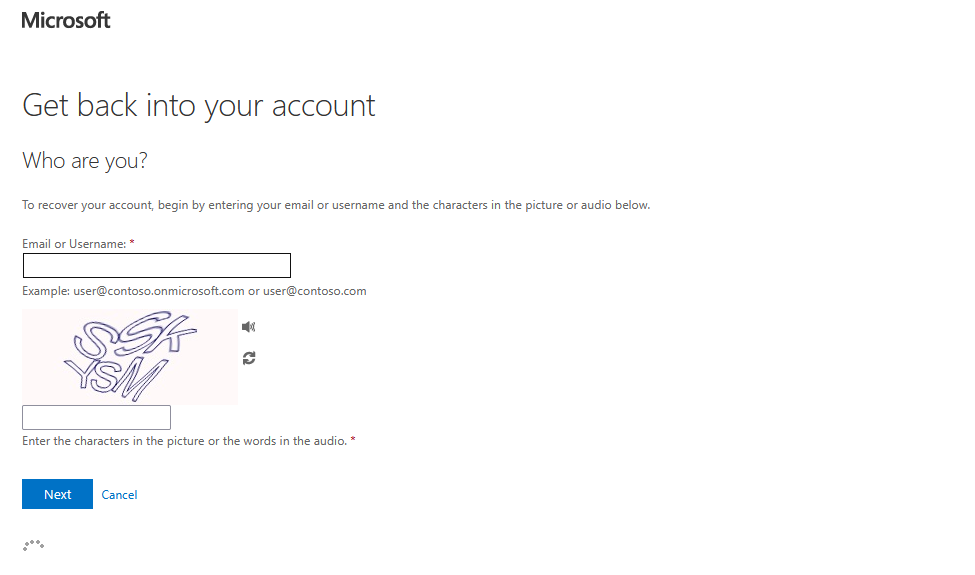
As of August 2026, Microsoft removed this CAPTCHA entirely and replaced it with backend throttling and behaviour-based abuse detection (see MC1400824). The landing page now presents only the email field with no visual challenge.
Whether the backend controls are effective against low-and-slow enumeration at realistic request rates remains to be demonstrated in practice.
Defensive Considerations
User enumeration
The portal distinguishes between accounts that exist and those that do not. A valid account advances to the method selection screen. An invalid one returns a visible error message and keeps CurrentViewName at ViewUserIdentifierVerification with the UserIdErrorLabel span set to display:inline.
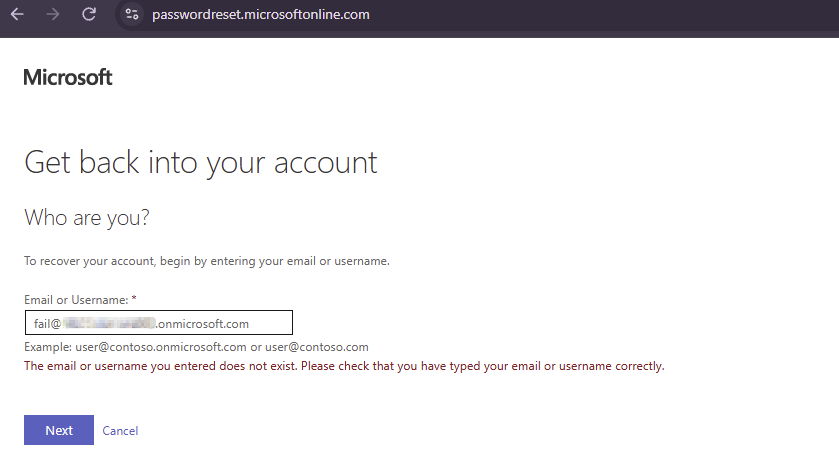
This makes it straightforward to confirm whether a given email address corresponds to a real account in the tenant - useful information for an attacker building a target list.
Importantly, every non-ViewUserIdentifierVerification response - including SSPR_0011, SSPR_0013, and the guest/federated not-available response - is confirmation that the account exists. The server only reaches those policy checks after successfully resolving the username in the directory. A true not-found simply bounces the form back to step 1.
Authentication method leakage
For accounts where SSPR is enabled, the portal reveals exactly which second factors are registered. An attacker can see whether an account has a strong factor (authenticator app, push notification, phone) or only a weak one (alternate email OTP, security questions). Accounts with weak-only methods or no methods at all are considerably easier to compromise - there is no meaningful second factor standing between an attacker and the account if they obtain or guess the password.
Admin account identification
Microsoft enforces SSPR for administrator accounts regardless of the tenant-wide SSPR policy. If an organisation has disabled SSPR for standard users, standard accounts return a ViewSsprNotEnabledInUserPolicy response. Admin accounts, however, still advance to the method selection screen. Any account that enumerates cleanly when the broader tenant policy is disabled is likely a privileged role account. This works because ViewSsprNotEnabledInUserPolicy (SSPR_0011) is only returned for standard users - admin accounts bypass this check entirely and proceed to method enumeration regardless. Their registered methods are also visible, meaning an attacker can identify high-value targets and assess how well-protected they are before deciding how to proceed.
The note is visible in the Entra admin centre itself on the Password reset Properties page - SSPR policy settings explicitly apply only to end users, with admins always enabled regardless.
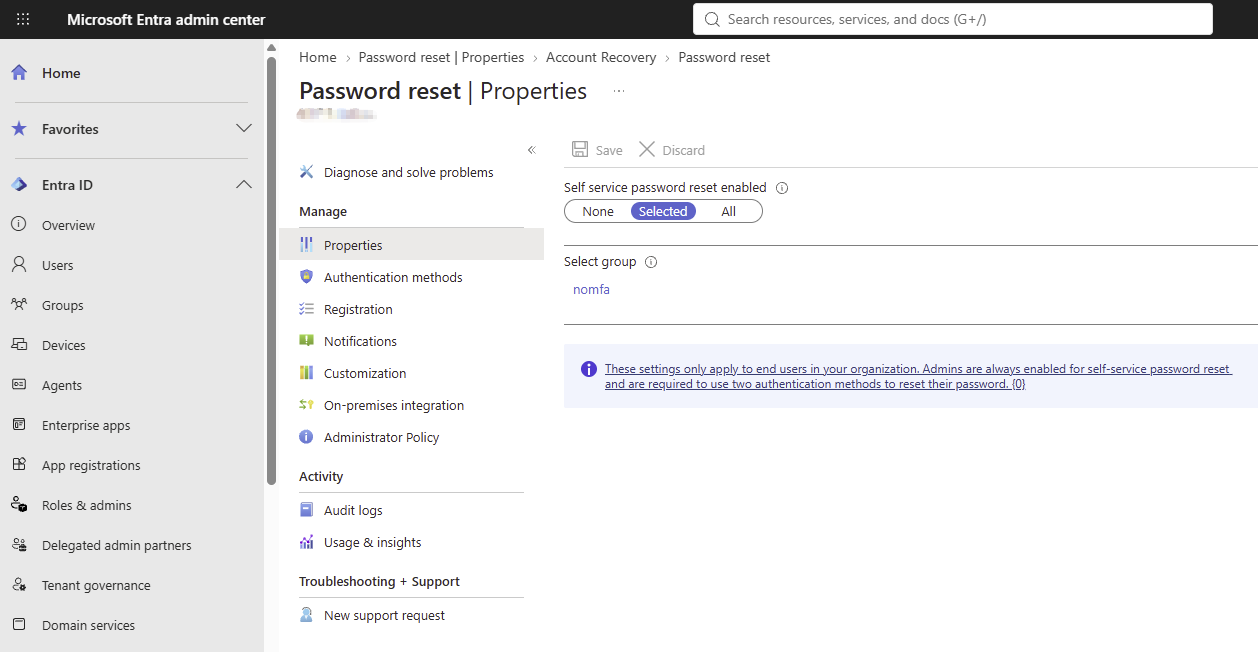
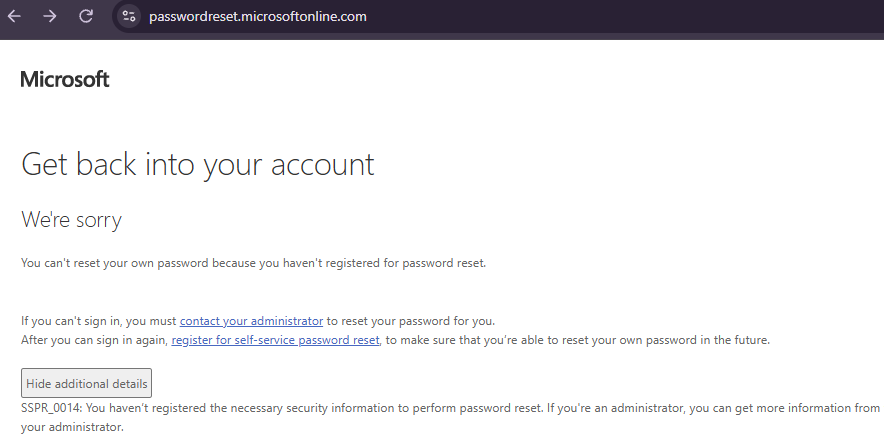
When SSPR is scoped to a specific group (as above with the nomfa group), users outside that group receive a ViewUserNotMemberOfScopedAccessGroup response. Users inside the group who haven’t registered any methods see the following rather than the radio button selection screen:
Adversarial Opportunities
The SSPR portal is public-facing, requires no authentication, and behaves differently depending on whether an account exists and what methods it has configured. This makes it useful for several stages of a campaign:
Reconnaissance. Validate a list of email addresses harvested from LinkedIn, company websites, or data breaches. Separate confirmed accounts from guesses before investing further effort.
Target prioritisation. Identify accounts with weak or missing MFA. These are the most viable targets for password spraying, credential stuffing, or phishing - an attacker who compromises the password has a clear path to access.
Privilege escalation preparation. In tenants where standard SSPR is disabled, enumerate admin accounts specifically. Knowing which accounts have privileged roles, and what their registered factors are, helps an attacker decide where to focus a targeted phishing campaign.
Method-aware phishing. Knowing that a target uses SMS rather than an authenticator app informs the choice of attack. SMS-based MFA is susceptible to SIM swapping and real-time phishing proxies in a way that TOTP is not.
Weak Methods Worth Flagging
Not all second factors are equal. The following are considered weak because they can be phished or socially engineered without significant difficulty:
- Alternate email OTP - the attacker only needs access to a secondary inbox, which may itself be weakly protected
- Security questions - answers are often guessable, publicly available, or obtainable through social engineering
An account that has only these methods registered should be treated similarly to an account with no MFA at all for practical threat modelling purposes.
Limitations of This Approach
It is worth being clear about what the SSPR portal does and does not reveal.
SSPR and MFA use separate method registries. In practice they overlap significantly - Microsoft’s combined registration flow, the default since 2020, registers methods for both simultaneously. But they are not guaranteed to be identical. A method registered for MFA sign-in may not appear in SSPR if it was registered before combined registration was enabled, or if an admin has explicitly excluded it from the SSPR policy.
FIDO2 security keys and certificate-based authentication are not supported by SSPR at all. An account whose only factor is a hardware security key will appear here as having no methods - a false negative. In high-security or passwordless environments this is worth accounting for.
Guest and federated accounts authenticate through their home tenant. The resource tenant’s SSPR portal has no visibility into their home tenant’s method registry and returns ViewFeatureNotAvailable. Their MFA posture cannot be assessed this way.
SSPR disabled or misconfigured (SSPR_0011 / SSPR_0014). If SSPR is not licensed or not enabled for a user, the endpoint returns ViewSsprNotEnabledInUserPolicy (SSPR_0011) and no method information is available. The account exists and likely has MFA configured, but this tool cannot determine what. A related code, SSPR_0014 (UserNotProperlyConfigured), applies when the account is in scope but has registered no authentication methods - this surfaces as ViewMultigateUserControl with an empty radio table rather than a separate view name, so it is identified by the absence of methods rather than the view itself. Both confirm the account exists.
Defensive Recommendations
Enable SSPR selectively and monitor it. SSPR access can be scoped to a specific security group. Restricting it to users who genuinely need it reduces the attack surface and makes enumeration harder. Accounts outside the scoped group return a ViewUserNotMemberOfScopedAccessGroup response that confirms existence but not methods.
Enforce strong authentication methods. Remove alternate email and security questions from the permitted SSPR methods list if your organisation’s policy allows it. Require authenticator app or phone verification as a minimum.
Monitor the SSPR portal for unusual activity. Bulk enumeration attempts - many requests in a short window across varied email addresses, with no subsequent password reset completion - are detectable patterns. Entra ID logs SSPR activity under the audit logs and sign-in logs. Unusual volumes of UserIdentifierVerification events from the same source IP are worth alerting on.
Use Conditional Access to protect privileged accounts. Admin accounts should have phishing-resistant MFA (FIDO2, certificate-based) rather than SMS or authenticator push. Even if an attacker identifies a privileged account through SSPR, a phishing-resistant factor significantly raises the cost of exploitation.
Consider restricting methods for admin accounts. Microsoft enforces SSPR on admin accounts at the platform level and this cannot be disabled, but the methods admins register can be restricted to strong factors only, limiting what an attacker learns and reducing the available attack surface.
What Changes When SSPR Policy Changes
The two outputs below show the same four accounts run against the same tenant under two different SSPR configurations. The difference in results demonstrates exactly why the CurrentViewName field is more informative than a simple pass/fail.
Configuration 1 - SSPR disabled for all standard users (None)
1
2
3
4
5
6
7
8
9
10
11
12
13
14
15
16
17
12:55:37 [1/4] user1@example.com - SSPR DISABLED  (SSPR_0011)  [2.4s]
12:55:42 [2/4] admin@example.com - MFA OK  methods=['Alternate Email (OTP)', 'Authenticator App (TOTP)']  [2.0s]
12:55:47 [3/4] fail@example.com - USER NOT FOUND  [0.7s]
12:55:52 [4/4] nomfa@example.com - SSPR DISABLED  (SSPR_0011)  [3.3s]

--- Summary (17.0s) ---
  SSPR enabled   : 1/4
  SSPR disabled  : 2/4  (account exists; policy blocks SSPR)

--- Valid accounts ---
user1@example.com
admin@example.com
nomfa@example.com

--- SSPR disabled (account exists) ---
user1@example.com
nomfa@example.com
Three accounts are confirmed to exist. Two return ViewSsprNotEnabledInUserPolicy (SSPR_0011) - the server found the account, checked the policy, and declined to proceed. One (admin) reaches the method selection screen because it is an admin account. Admin accounts bypass the user policy check entirely and always proceed to SSPR regardless of the tenant setting, which is what makes them identifiable here. nomfa returns the same SSPR_0011 response as user1 - both exist, but we cannot tell from this run alone whether nomfa has any MFA methods registered.
Configuration 2 - SSPR scoped to a selected group
1
2
3
4
5
6
7
8
9
10
11
12
13
14
15
16
13:19:34 [1/4] user1@example.com - SSPR DISABLED  (Not in SSPR group - SSPR restricted and user excluded)  [2.2s]
13:19:39 [2/4] admin@example.com - MFA OK  methods=['Alternate Email (OTP)', 'Authenticator App (TOTP)']  [2.0s]
13:19:43 [3/4] fail@example.com - USER NOT FOUND  [0.9s]
13:19:47 [4/4] nomfa@example.com - NO MFA  methods=['(none - no SSPR methods registered)']  [4.7s]

--- Summary (17.7s) ---
  SSPR enabled   : 2/4
  SSPR disabled  : 1/4

--- Valid accounts ---
user1@example.com
admin@example.com
nomfa@example.com

--- Weak or no MFA ---
nomfa@example.com
The same four accounts, different policy. user1 now returns ViewUserNotMemberOfScopedAccessGroup (SSPR_0013) instead of SSPR_0011 - the account exists but is not in the security group that has been granted SSPR access. nomfa now returns ViewMultigateUserControl with an empty method list, meaning it is inside the scoped group, SSPR proceeded normally, and the account has no verification methods registered at all. This is SSPR_0014 territory (UserNotProperlyConfigured) - the account is reachable but has nothing to verify with.
What the difference tells us
| Account | Config 1 | Config 2 | Conclusion |
|---|---|---|---|
user1 | SSPR_0011 (policy disabled) | SSPR_0013 (not in group) | Exists; no SSPR access in either config |
admin | MFA OK | MFA OK | Admin account; bypasses policy both times |
fail | NOT FOUND | NOT FOUND | Does not exist |
nomfa | SSPR_0011 (policy disabled) | NO MFA (empty methods) | Exists; in the scoped group; no MFA registered |
nomfa is the interesting one. Config 1 could not tell us anything about its MFA posture because SSPR never reached the method check. Config 2 reveals it has no methods registered at all - a much more actionable finding. Scoped SSPR, counterintuitively, leaks more information about the accounts that are inside the group than a blanket disabled policy does, because those accounts proceed all the way to method enumeration.
The no-MFA assumption from SSPR_0014
When an account is in scope for SSPR but has no authentication methods registered, Microsoft returns SSPR_0014 and the user sees:
You can’t reset your own password because you haven’t registered for password reset.
The Microsoft documentation for SSPR_0014 states: “You haven’t registered the necessary security information to perform password reset.”
This is directly relevant to MFA posture. Because Microsoft’s combined registration experience registers methods for both SSPR and MFA in the same flow, an account that has not registered for password reset has almost certainly not registered for MFA either. The two share the same method registry on modern tenants - if nothing was registered for SSPR, there is nothing registered for MFA sign-in either.
This is not a guarantee. As noted in the limitations, a user could have registered MFA methods through a legacy flow before combined registration was enabled, or an admin could have pre-seeded MFA methods without going through the SSPR registration flow. In practice on most standard tenants these cases are uncommon. An SSPR_0014 response - or equivalently, a ViewMultigateUserControl with an empty radio table - is a strong signal that the account has no meaningful second factor protecting sign-in and should be treated as a high-priority finding.
ResetSpy
Based on the above, a simple Python script was put together to automate the enumeration process against a list of target accounts. ResetSpy replicates the two-request flow described above for each target, parses the CurrentViewName field and MultigateAuthenticationControl_RadioTable from the response, and classifies each account.
1
2
3
4
5
# Single account
resetspy user@example.com

# List of accounts
resetspy emails.txt --csv results.csv
For each target it returns:
- Whether the account exists in the directory
- Which SSPR verification methods are registered, if any
- Whether those methods constitute a meaningful second factor or are weak-only
- The SSPR policy state - disabled, scoped group exclusion, guest/federated, or fully enabled
1
2
3
4
5
6
7
8
9
10
11
12
13
14
15
16
17
18
19
20
21
22
23
24
25
26
27
28
29
30
31
32
33
                                ResetSpy
────────────────────────────────────────────────────────────────────────
  Target   : emails.txt
  Endpoint : https://passwordreset.microsoftonline.com/
  Accounts : 5
  Delay    : 2.0s + jitter
  Retries  : 1
  UA pool  : 16

10:52:05 [1/5] alice@example.com - MFA OK  methods=['Authenticator App (TOTP)']  [2.1s]
10:52:08 [2/5] bob@example.com - NO MFA  methods=['Alternate Email (OTP)']  [1.9s]
10:52:11 [3/5] ghost@example.com - USER NOT FOUND  [1.1s]
10:52:14 [4/5] admin@example.com - SSPR DISABLED  (SSPR not enabled in user policy (SSPR_0011))  [1.7s]
10:52:17 [5/5] guest_example.net#EXT#@example.com - SSPR N/A  (guest/external/federated)  [1.4s]

--- Summary (9.3s) ---
  Total          : 5
  Valid accounts : 3/5
  Not found      : 1/5
  SSPR enabled   : 2/5
  SSPR disabled  : 1/5  (account exists; policy blocks SSPR)
  SSPR N/A       : 1/5  (guest/external/federated)
  CAPTCHA        : 0/5
  Errors         : 0/5
  No/Weak MFA    : 1/2

--- Valid accounts ---
alice@example.com
bob@example.com
admin@example.com

--- Weak or no MFA ---
bob@example.com  ['Alternate Email (OTP)']
Results can be exported to CSV with --csv. The MFA Status column in the output makes flagged accounts immediately apparent - PROTECTED, WEAK ONLY - FLAGGED, or NO METHODS - FLAGGED - useful for triaging large account lists quickly.
The tool also handles the various SSPR policy states that return non-standard view names - scoped group exclusions, feature-unavailable responses for guest accounts, and throttle responses - rather than treating them all as errors. User-Agent strings are rotated per request from a pool of 16 realistic browser strings across Windows, macOS, iOS, and Android to reduce fingerprinting, and jitter is applied between requests to avoid trivial rate-limit detection.
ResetSpy is available at github.com/mlcsec/ResetSpy.